ElasticSearch7 
一些概念 
Elastic Stack核心 
The Elastic Stack 包括 Elasticsearch、Kibana、Beats 和 Logstash(也称为 ELK Stack)。Elasticsearch 简称 ES,ES 是一个开源的高扩展的分布式全文搜索引擎,是整个 Elastic Stack 技术栈的核心。它可以近乎实时的存储、检索数据。本身扩展性很好。可以扩展到上百台服务器,处理 PB 级别的数据。
核心定义 
Elasticsearch 是面向文档型数据库,一条数据就是一个文档。
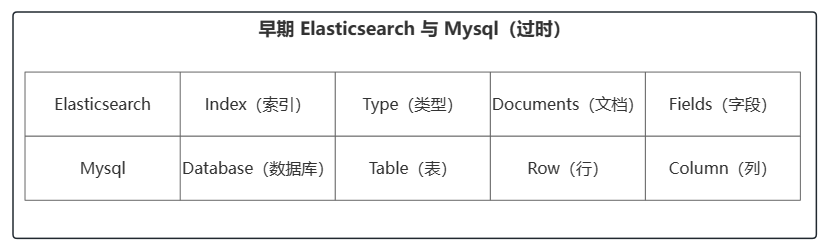
ES 6.0之前 Index 可以看作是一个库,而 Types 相当于表,Documents 则相当于表的行。不过 Types 的概念已经逐渐弱化,在 ES6.X 中,一个 Index 下已经只能包含一个 Type,在 ES7.X 中,Type的概念已经被移除了
RESTful 
- GET:非幂等性
- POST:非幂等性
- PUT:幂等性
- DELETE:幂等性
数据分类 
数据大致可分为两类
- 结构化数据:也称作行数据,是由二维表结构来逻辑表达和实现的数据,严格地遵循数据格式与长度规范,主要通过关系型数据库进行存储和管理。如MySQL、PGSQL 等
- 非结构化数据:又可称为全文数据,不定长或无固定格式,不适于由数据库二维表来表现,包括所有格式的办公文档、XML、HTML、Word、日志等,主要通过 NOSQL 存储管理。如 MongoDB、redis、Elasticserach等
非结构化数据更细致划分可以划分出半结构化数据。XML、HTML 可划分为半结构化数据,因为它们也具有自己特定的标签格式,所以既可以根据需要按结构化数据来处理,也可抽取出纯文本按非结构化数据来处理。
对于两种类型的数据,搜索也可分为两种
- 结构化数据搜索:因为它们具有特定的结构,所以我们一般都是可以通过关系型数据库(MySQL,Oracle 等)的二维表(Table)的方式存储和搜索,也可以建立索引
- 非结构化数据搜索:对于非结构化数据搜索,可以分为两种方法
- 顺序扫描:通过文字名称也可了解到它的大概搜索方式,即按照顺序扫描的方式查询特定的关键字
- 全文检索:将非结构化数据中的一部分信息提取出来,重新组织,使其变得有一定结构,然后对此有一定结构的数据进行搜索
倒排索引 
- 正排索引:以 id 为索引检索数据内容
- 倒排索引:以数据内容为索引,检索 id
倒排索引为了创建倒排索引会对内容进行分词,通过分词器将每个文档的内容域拆分成单独的词(词条或 Term),创建一个包含所有不重复词条的排序列表,然后列出每个词条出现在哪个文档
例如:
存在数据如下
11 Java is the best programming language.
22 PHP is the best programming language.
33 Javascript is the best programming language.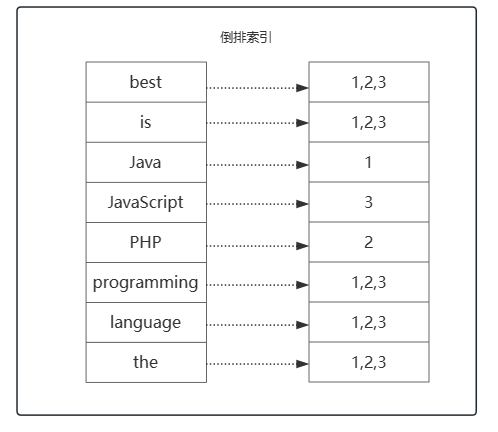
ES 基本使用 
请求路径省略127.0.0.1:9200
安装 
从官网下载 Elasticsearch:官方分布式搜索和分析引擎 | Elastic
tex1elasticsearch-7.17.7 2 --bin 可执行文件 3 --config 配置文件 4 --jdk jdk运行环境 5 --lib 类库(jar) 6 --logs 7 --modules 8 --plugins 插件进入bin目录,点击
elasticsearch.bat启动 Elasticsearch默认9300端口:集群间组件的通信端口
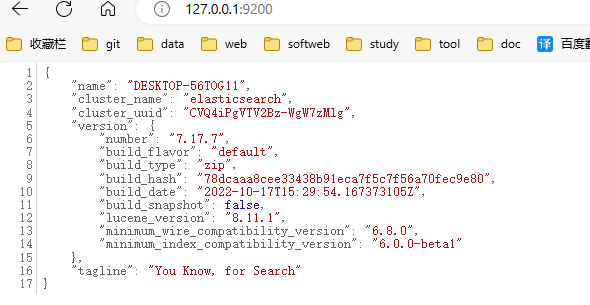
默认9200端口:浏览器访问 http 协议的 RESTful 端口
打开浏览器,输入地址 127.0.0.1:9200
基础操作 
创建索引 shopping:
PUT /shopping获取 shopping 索引信息:
GET /shopping获取所有索引信息:
GET /_cat//_cat/indices?v,?v 表示将信息详细展示出来删除索引:
DELETE /shopping创建文档:
POST /shopping/_doc,请求体内容如下:json1{ 2 "title":"小米手机", 3 "category":"小米", 4 "images":"2312134564213", 5 "price":2999.99 6}/shopping/_doc/id可以自定义新增文档的 id,而非 ES 自动生成查询
主键查询:
GET /shopping/_doc/1001全部查询:
GET /shopping/_search更改
全量更改:
PUT /shopping/_doc/1001,请求体为更新的数据局部修改:
POST /shopping/_update/1001,请求体如下:json1{ 2 "doc":{ 3 "title":"华为手机" 4 } 5}删除文档:
DELETE /shopping/_doc/1001
复杂查询 
查询、分页、过滤字段、排序
GET /shopping/_search,请求体如下
 1{
 2    "query":{
 3        "match_all":{     // 查询所有数据,可以使用 "match":{"title":"小米手机"} 查询需要的数据
 4        }
 5    },
 6    "from":0,     // 哪一页(从0开始)
 7    "size":2,	  // 查询几条
 8    "_source":["title"],	 // 需要查询的字段
 9    "sort":{		 // 排序
10        "price":{
11            "order":"asc"
12        }
13    }
14}
分页查询第一页数据,总共查询两条,查询的字段为 title
多条件查询、范围查询
GET /shopping/_search,请求体如下
 1{
 2	"query": {
 3		"bool": {
 4			"should": [    // must 类似于SQL中and;should类似于SQL中or
 5				{
 6					"match": {
 7						"category": "小米"
 8					}
 9				},
10				{
11					"match": {
12						"category": "华为"
13					}
14				}
15			],
16			"filter": {
17				"range": {		// 范围过滤
18					"price": {
19						"gt": 4000		// 价格大于4000的
20					}
21				}
22			}
23		}
24	}
25}
查询 category 为小米或华为的,且 price 大于 4000 的数据
全文检索、完全匹配、高亮查询
GET /shopping/_search,请求体如下
 1{
 2	"query": {
 3		"match_phrase": {		// match 会对关键字进行分词然后匹配,match_phrase 则表示完全匹配
 4			"category": "华为"
 5		}
 6	},
 7	"highlight": {		// 高亮字段,返回数据会用特殊标签包起来
 8		"fields": {
 9			"category": {}
10		}
11	}
12}
聚合查询
GET /shopping/_search,请求体如下
 1{
 2	"aggs": {  // 聚合操作
 3		"price_avg": {  // 返回名称,随意取
 4			"avg": {  // 平均值
 5				"field": "price"
 6			}
 7		}
 8	},
 9	"size": 0
10}
查询 price 的平均值,返回数据字段名为 price_avg
 1{
 2	"aggs": {
 3		"price_group": {
 4			"terms": {   // 类似于 group
 5				"field": "price"
 6			}
 7		}
 8	},
 9	"size": 0
10}
根据 price 分组查询数量,返回数据字段名为 price_group
映射关系 
mapping 是用于定义 ES 对索引中字段的存储类型、分词方式和是否存储等信息,就像数据库中的 Schema ,描述了文档可能具有的字段或属性、每个字段的数据类型。ES 对于字段类型可以不指定然后动态对字段类型猜测,也可以在创建索引时具体指定字段的类型。
创建索引:
PUT /user定义映射关系:
PUT /user/_mapping,请求 body 如下:json1{ 2 "properties": { 3 "name": { 4 "type": "text", // 分词,支持全文检索 5 "index": true // 是否索引 6 }, 7 "sex": { 8 "type": "keyword", // 不分词 9 "index": true 10 }, 11 "tel": { 12 "type": "keyword", 13 "index": false 14 } 15 } 16}新增文档
json1{ 2 "name": "张三", // match 关键字”张/三/张三“都可以匹配到数据 3 "sex": "男生", // match 关键字必须为 ”男生“ 才能匹配到数据 4 "tel": "19882445846" // 查询报错,不支持索引 5}
text 和 keyword 区别主要在于是否会利用分词器进行分词
text类型:
- 会进行分词,分词后建立索引。【比如:对于‘佟永硕’,ik分词器的smart分词会自动将其分成佟、永、硕三个字符进行建立索引,所以单字符搜索可以搜索到,而比如‘永硕’则搜索不到】
- 支持模糊查询,支持准确查询。
- 不支持聚合查询
keyword类型:
- 不分词,直接建立索引。【依据此特点,可以使用keyword类型+wildcardQuery(通配查询)实现类似sql的like查询(模糊搜索)】
- 支持模糊查询,支持准确查询。
- 支持聚合查询。
常用 ES Java API 
索引操作 
 1public class CH04ESTestOne {
 2    final static Log logger = LogFactory.getLog(CH04ESTestOne.class);
 3
 4    public static void main(String[] args) {
 5        try (RestClient restClient = RestClient
 6                .builder(new HttpHost("127.0.0.1", 9200, "http"))
 7                .build()) {
 8            // Create the Java API Client with the same low level client
 9            ElasticsearchTransport transport = new RestClientTransport(
10                    restClient,
11                    new JacksonJsonpMapper()
12            );
13            ElasticsearchClient esClient = new ElasticsearchClient(transport);
14//            createIndex(esClient);
15//            queryIndex(esClient);
16//            deleteIndex(esClient);
17        } catch (Exception e) {
18            e.printStackTrace();
19        }
20    }
21
22    /**
23     * 删除索引
24     */
25    private static void deleteIndex(ElasticsearchClient esClient) throws IOException {
26        DeleteIndexResponse deleteIndexResponse = esClient.indices().delete(new DeleteIndexRequest.Builder()
27                .index("user1")
28                .build());
29        // 是否成功
30        boolean acknowledged = deleteIndexResponse.acknowledged();
31    }
32
33    /**
34     * 查询索引
35     */
36    private static void queryIndex(ElasticsearchClient esClient) throws IOException {
37        GetIndexResponse getIndexResponse = esClient.indices().get(new GetIndexRequest.Builder()
38                .index("user1")
39                .build());
40
41        System.out.println(getIndexResponse.get("user1").toString());
42        logger.info("请求成功");
43    }
44
45    /**
46     * 创建索引
47     */
48    private static void createIndex(ElasticsearchClient esClient) throws IOException {
49        CreateIndexResponse createIndexResponse = esClient.indices().create(new CreateIndexRequest.Builder()
50                .index("user1")
51                .build());
52        // 是否成功
53        boolean acknowledged = createIndexResponse.acknowledged();
54    }
55
56}
文档操作 
 1public class CH04ESTestOne {
 2    final static Log logger = LogFactory.getLog(CH04ESTestOne.class);
 3
 4    public static void main(String[] args) {
 5        try (RestClient restClient = RestClient
 6                .builder(new HttpHost("127.0.0.1", 9200, "http"))
 7                .build()) {
 8            // Create the Java API Client with the same low level client
 9            ElasticsearchTransport transport = new RestClientTransport(
10                    restClient,
11                    new JacksonJsonpMapper()
12            );
13
14            ElasticsearchClient esClient = new ElasticsearchClient(transport);
15//            createAndUpdateDoc(esClient);
16//            batchCreateAndUpdateDoc(esClient);
17//            deleteDoc(esClient);
18        } catch (Exception e) {
19            e.printStackTrace();
20        }
21    }
22    /**
23     * 根据 id 删除文档
24     */
25    private static void deleteDoc(ElasticsearchClient esClient) throws IOException {
26        DeleteResponse deleteResponse = esClient.delete(new DeleteRequest.Builder()
27                .index("user1")
28                .id("1001")
29                .build());
30        logger.info("操作成功");
31    }
32
33    /**
34     * 批量新增/更新文档
35     */
36    private static void batchCreateAndUpdateDoc(ElasticsearchClient esClient) throws IOException {
37        List<Map<String, Object>> param = new ArrayList<>();
38        param.add(Map.of("id", "1002", "name", "lisi1", "sex", "女生", "tel", "19645231678"));
39        param.add(Map.of("id", "1003", "name", "lisi2", "sex", "男生", "tel", "19645231678"));
40        param.add(Map.of("id", "1004", "name", "lisi3", "sex", "女生", "tel", "19645632178"));
41
42        BulkRequest.Builder builder = new BulkRequest.Builder();
43
44        for (Map<String, Object> map : param) {
45            builder.operations(new BulkOperation.Builder()
46                    .index(new IndexOperation.Builder<>()
47                            .index("user1")
48                            .id((String) map.get("id"))
49                            .document(map)
50                            .build())
51                    .build()
52            );
53        }
54
55        BulkResponse bulkResponse = esClient.bulk(builder.build());
56
57        if (bulkResponse.errors()) {
58            for (BulkResponseItem item : bulkResponse.items()) {
59                if (item.error() != null) {
60                    logger.error(item.error().reason());
61                }
62            }
63        }
64    }
65
66
67    /**
68     * 新增/更新 文档,根据id,如果id不存在则新增,id存在则更新
69     */
70    private static void createAndUpdateDoc(ElasticsearchClient esClient) throws IOException {
71        Map<String, Object> param = new HashMap<>();
72        param.put("name", "zahngsan");
73        param.put("sex", "男生");
74        param.put("tel", "19882445846");
75        IndexResponse indexResponse = esClient.index(new IndexRequest.Builder<>()
76                .index("user1")
77                .id("1001")
78                .document(param)
79                .build());
80        logger.info("操作成功");
81    }
82}
文档查询 
  1public class CH04ESTestOne {
  2    final static Log logger = LogFactory.getLog(CH04ESTestOne.class);
  3
  4    public static void main(String[] args) {
  5        try (RestClient restClient = RestClient
  6                .builder(new HttpHost("127.0.0.1", 9200, "http"))
  7                .build()) {
  8            // Create the Java API Client with the same low level client
  9            ElasticsearchTransport transport = new RestClientTransport(
 10                    restClient,
 11                    new JacksonJsonpMapper()
 12            );
 13
 14            ElasticsearchClient esClient = new ElasticsearchClient(transport);
 15//            searchDocById(esClient);
 16//            searchDocA(esClient);
 17//            searchDocB(esClient);
 18//            searchDocC(esClient);
 19        } catch (Exception e) {
 20            e.printStackTrace();
 21        }
 22    }
 23
 24     /**
 25     * 聚合操作
 26     * 根据查询条件求出平均价格
 27     */
 28    private static void searchDocC(ElasticsearchClient esClient) throws IOException {
 29        SearchResponse<Void> searchResponse = esClient.search(new SearchRequest.Builder()
 30                        .index("shopping")
 31                        .query(new Query.Builder()
 32                                .match(new MatchQuery.Builder()
 33                                        .field("title")
 34                                        .query("华为手机")
 35                                        .build()
 36                                ).build())
 37                        .aggregations("price_group", new Aggregation.Builder()
 38                                .avg(new AverageAggregation.Builder()
 39                                        .field("price")
 40                                        .build()
 41                                ).build())
 42                        .size(0)
 43                        .build()
 44                , Void.class);
 45        TotalHits total = searchResponse.hits().total();
 46        boolean isExactResult = Objects.equals(total.relation(), TotalHitsRelation.Eq);
 47
 48        if (isExactResult) {
 49            logger.info("There are " + total.value() + " results");
 50        } else {
 51            logger.info("There are more than " + total.value() + " results");
 52        }
 53
 54        System.out.println(searchResponse.aggregations());
 55        logger.info("操作成功");
 56    }
 57
 58     /**
 59     * 搜索文档;多条件和范围查询
 60     */
 61    private static void searchDocB(ElasticsearchClient esClient) throws IOException {
 62        List<Query> queryList = List.of(
 63                new Query.Builder()
 64                        .match(m->m
 65                                .field("category")
 66                                .query("小米")
 67                        ).build(),
 68                new Query.Builder()
 69                        .match(m->m
 70                                .field("category")
 71                                .query("华为")
 72                        ).build()
 73                );
 74        SearchResponse<JsonNode> searchResponse = esClient.search(s -> s
 75                        .index("shopping")
 76                        .query(q -> q
 77                                .bool(b -> b
 78                                        .should(queryList)
 79                                        .filter(f -> f
 80                                                .range(r -> r
 81                                                        .field("price")
 82                                                        .gt(JsonData.of("4000"))
 83                                                )
 84                                        )
 85                                )
 86                        )
 87                , JsonNode.class);
 88        TotalHits total = searchResponse.hits().total();
 89        boolean isExactResult = Objects.equals(total.relation(), TotalHitsRelation.Eq);
 90
 91        if (isExactResult) {
 92            logger.info("There are " + total.value() + " results");
 93        } else {
 94            logger.info("There are more than " + total.value() + " results");
 95        }
 96
 97        List<Hit<JsonNode>> hits = searchResponse.hits().hits();
 98        for (Hit<JsonNode> hit : hits) {
 99            JsonNode product = hit.source();
100            logger.info(product);
101        }
102        logger.info("操作成功");
103    }
104
105    /**
106     * 搜索文档;条件分页查询排序
107     */
108    private static void searchDocA(ElasticsearchClient esClient) throws IOException {
109        SearchResponse<JsonNode> searchResponse = esClient.search(new SearchRequest.Builder()
110                .index("shopping")
111                .query(new Query.Builder()
112                        .match(new MatchQuery.Builder()
113                                .field("title")
114                                .query("华为手机")
115                                .build()
116                        ).build())
117                .from(0)
118                .size(2)
119                        .source(new SourceConfig.Builder()
120                                .filter(new SourceFilter.Builder()
121                                        .includes("title","category")
122                                        .build()
123                                ).build())
124                .sort(new SortOptions.Builder()
125                        .field(new FieldSort.Builder()
126                                .field("price")
127                                .order(SortOrder.Asc)
128                                .build()
129                        ).build()
130                ).build(), JsonNode.class);
131        TotalHits total = searchResponse.hits().total();
132        boolean isExactResult = Objects.equals(total.relation(), TotalHitsRelation.Eq);
133
134        if (isExactResult) {
135            logger.info("There are " + total.value() + " results");
136        } else {
137            logger.info("There are more than " + total.value() + " results");
138        }
139
140        List<Hit<JsonNode>> hits = searchResponse.hits().hits();
141        for (Hit<JsonNode> hit : hits) {
142            JsonNode product = hit.source();
143            logger.info(product);
144        }
145        logger.info("操作成功");
146    }
147
148    /**
149     * 根据 id 查询文档
150     */
151    private static void searchDocById(ElasticsearchClient esClient) throws IOException {
152        GetResponse<ObjectNode> getResponse = esClient.get(new GetRequest.Builder()
153                        .index("shopping")
154                        .id("1001")
155                        .build(),
156                ObjectNode.class);
157        ObjectNode source = getResponse.source();
158        logger.info("操作成功");
159    }
160
161}
利用 docker 搭建 ES 集群 
修改系统配置 ,进入文件
/etc/sysctl.conf,添加以下内容ini1## 系统虚拟内存默认最大映射数为65530,无法满足ES系统要求,需要调整为262144以上 2vm.max_map_count = 262144应用配置
bash1sysctl -p创建 docker 网络
bash1docker network create --driver bridge --subnet 192.168.77.0/24 --gateway 192.168.77.1 mynet创建以下目录结构,作为创建 es 容器时的挂载卷
ascii1es 2├── node1 ## 节点1 3│ ├── config ## 配置文件存放目录 4│ └── data #数据存放目录 5│ └── nodes 6└── node2 7 ├── config 8 └── data 9 └── nodes配置文件权限
bash1chmod -R 777 es/**拉取镜像
bash1docker pull elasticsearch:7.17.7先启动一个 ES 容器,将配置文件结构拷贝出来
bash1## 启动 es 2docker run -d --name elasticsearch --net mynet -p 9200:9200 -p 9300:9300 -e "discovery.type=single-node" elasticsearch:7.17.7 3 4## 将 es 容器中的 /usr/share/elasticsearch/config 拷贝到 es/node1/下 5## docker cp 容器id:容器文件路径 主机路径,将容器中文件拷贝到主机 6docker cp 97a4205f7844:/usr/share/elasticsearch/config es/node1/ 7docker cp 97a4205f7844:/usr/share/elasticsearch/config es/node2/ 8 9## 删除 es 容器 10docker rm -f elasticsearch编写配置文件
es/node1/config/elasticsearch.yml
yaml1## 集群名称 2cluster.name: "docker-cluster" 3## 允许链接地址 4network.host: 0.0.0.0 5## 当前节点名称 6node.name: es1 7## 初始化的主节点 8cluster.initial_master_nodes: ["es1"] 9## 集群节点的 host 10discovery.seed_hosts: ["192.168.77.101", "192.168.77.102"] 11#跨域 12http.cors.enabled: true 13http.cors.allow-origin: "*"es/node2/config/elasticsearch.yml
yaml1cluster.name: "docker-cluster" 2network.host: 0.0.0.0 3node.name: es2 4cluster.initial_master_nodes: ["es1"] 5discovery.seed_hosts: ["192.168.77.101", "192.168.77.102"] 6http.cors.enabled: true 7http.cors.allow-origin: "*"创建并启动容器 es1、es2
bash1## --name 容器名称 2## --net mynet 指定容器网络 3## -d 后台运行 4## -v 卷挂载 宿主机:容器 5## --ip 指定容器 ip 地址 6## --privileged=true 容器中 root 拥有真正的 root 权限 7 8## es1 创建并启动 9docker run -d --name es1 10--net mynet 11-p 15101:9200 -p 15111:9300 12-v /root/es/node1/config:/usr/share/elasticsearch/config -v /root/es/node1/data:/usr/share/elasticsearch/data 13--ip 192.168.77.101 --privileged=true 14elasticsearch:7.17.7 15 16 17#es2 创建并启动 18docker run -d --name es2 19--net mynet 20-p 15102:9200 -p 15112:9300 21-v /root/es/node2/config:/usr/share/elasticsearch/config -v /root/es/node2/data:/usr/share/elasticsearch/data 22--ip 192.168.77.102 --privileged=true 23elasticsearch:7.17.7测试集群是否启动成功
查看 es 健康状态:
GET /_cat/healthjson11702218386 14:26:26 docker-cluster green 2 2 4 2 0 0 0 0 - 100.0%查看集群主节点:
GET /_cat/masterjson1cF4Wgu_fRuqh8ntHfrdN5A 192.168.77.101 192.168.77.101 es1查看集群节点:
GET /_cat/nodesjson1192.168.77.101 5 98 0 0.22 0.14 0.15 cdfhilmrstw * es1 2192.168.77.102 18 98 0 0.22 0.14 0.15 cdfhilmrstw - es2查看集群健康状况:
GET /_cluster/healthjson1{ 2 "cluster_name": "docker-cluster", 3 "status": "green", 4 "timed_out": false, 5 "number_of_nodes": 2, 6 "number_of_data_nodes": 2, 7 "active_primary_shards": 2, 8 "active_shards": 4, 9 "relocating_shards": 0, 10 "initializing_shards": 0, 11 "unassigned_shards": 0, 12 "delayed_unassigned_shards": 0, 13 "number_of_pending_tasks": 0, 14 "number_of_in_flight_fetch": 0, 15 "task_max_waiting_in_queue_millis": 0, 16 "active_shards_percent_as_number": 100 17}查看集群状态:
GET /_cluster/stats查看集群节点状态:
GET /_nodes/process